Your CFO needs updated revenue projections by 9 AM, but your data lives across a dozen APIs—each with its own authentication, rate limits, and formats—and the fragile spreadsheet holding it together breaks whenever a vendor changes something. This isn’t a tooling issue; it’s an architecture problem. You need a properly designed financial data pipeline that extracts, transforms, and delivers clean data to Excel or other systems without manual intervention. Built right, it turns fragmented processes into reliable infrastructure so your team can focus on analysis, not data wrangling. That architecture combines secure API integration, audited ETL, and AI-assisted transformation to move data accurately, with minimal manual effort. The result is faster reporting, fewer errors, and compliance-ready documentation your CFO can trust.
Key Takeaways
- Three-component architecture is essential: Secure API integration (authentication, rate limits, protocol selection), intelligent ETL processing (transformations with compliance-grade audit trails), and automated Excel delivery (staging layers that respect Excel’s constraints while preserving downstream workflows) form the foundation of any production-ready financial data pipeline.
- Protocol selection matters: REST handles most batch reporting needs; WebSocket suits sub-minute dashboard requirements; FIX is reserved for order execution systems with microsecond latency demands.
- Compliance shapes architecture from day one: SOX Section 302 requires CEO/CFO certification of financial report accuracy, and Section 404 mandates internal controls assessment—pipelines must maintain immutable audit logs and documented change management.
- Excel constraints are real: Worksheets max out at 1,048,576 rows by 16,384 columns. The staging layer pattern prevents file-locking issues and decouples pipelines from analyst workbooks.
- Encryption is non-negotiable: AES-256 encryption protects data at rest; TLS 1.3 secures data in transit—both are standard requirements for financial services compliance.
- Exponential backoff with jitter is the standard retry pattern: AWS recommends this approach to prevent thundering herd problems when rate limits trigger simultaneous retries.
- Start with batch processing: Streaming adds operational complexity justified only by genuine sub-minute latency requirements. Most Excel-destined financial data can be handled by well-designed batch pipelines.
The goal of automated financial reporting isn’t eliminating Excel. Your auditors know Excel, regulators accept it, and executives trust the formats they’ve used for decades. The goal is eliminating the manual steps that feed Excel—the copy-paste workflows, the formula chains that break, the 4 AM data pulls before board meetings. Effective API to Excel integration transforms these pain points into reliable automation.
This guide shows you how to build that system. We’ll cover the foundational architecture, walk through implementation patterns with working code, address the compliance requirements that can’t be shortcuts, and show you how to scale as data volumes grow.
For teams that want pre-validated, audit-ready data without building extraction infrastructure from scratch, Daloopa’s API handles the complexity upstream. But whether you build or buy your extraction layer, the architectural principles here apply.
1. Financial Data Pipeline Foundations for Modern Finance
1.1 Understanding the Financial Data Ecosystem
Financial pipelines draw from four primary categories of sources, each with distinct characteristics that shape how you build integrations.
Market data APIs deliver pricing, volumes, and indices—either real-time or delayed. The defining characteristic is latency sensitivity. Even “delayed” data has freshness requirements measured in minutes, not hours.
Fundamental data APIs provide financial statements, ratios, and analyst estimates. Here, point-in-time accuracy matters more than speed. A quarterly EPS figure that was correct when you pulled it but has since been restated will poison your analysis. These APIs need to support as-reported versus restated queries.
Internal systems—ERPs, accounting platforms, proprietary databases—contain the data that makes your analysis differentiated. They also tend to be the most difficult to integrate, often requiring VPN connectivity, legacy protocols, or custom authentication schemes that predate OAuth by decades.
Alternative data encompasses everything from sentiment analysis to satellite imagery to web traffic patterns. The integration challenge here is less technical and more methodological: establishing whether the signal is actually predictive before building production infrastructure around it.
Each category demands different handling. Market data pipelines optimize for throughput and latency. Fundamental data pipelines optimize for auditability and point-in-time reconstruction. Internal system integrations optimize for security and reliability. Understanding these differences prevents the common mistake of building one-size-fits-all architecture that serves none of them well.
The Compliance Landscape
Regulatory requirements aren’t checkboxes to satisfy—they’re constraints that shape architectural decisions from day one.
SOX (Sarbanes-Oxley) affects any pipeline feeding data into public company financial statements. Section 302 requires CEO and CFO certification¹ that the signing officer has reviewed the report and that it does not contain untrue statements of material fact. This means pipelines must maintain immutable audit logs proving data lineage. Section 404 mandates internal controls assessment⁵, requiring that all annual financial reports include an Internal Control Report stating that management is responsible for an adequate internal control structure—meaning pipeline changes require documented change management rather than ad-hoc deployments.
GDPR applies whenever EU personal data flows through your systems, which happens more often than expected in financial contexts (customer transaction data, employee information in expense reports). Article 17’s right to erasure⁶ establishes that data subjects have the right to obtain erasure of personal data without undue delay, meaning pipelines need the ability to purge specific records on request. Article 30 requires documented records⁷ of processing activities, including what data flows where and for what purpose.
CCPA creates similar requirements for California consumer data, though financial institutions have partial exemptions for personal information covered by GLBA⁸—notably, this exemption applies to the data, not to the entire institution. The complexity arises with hybrid datasets that mix customer information with market data.
The practical implication: compliance isn’t a layer you add after building the pipeline. It’s a set of constraints that inform every design decision.
The Schema Drift Problem
APIs change. Fields get renamed, deprecated, or restructured—frequently without advance notice. A vendor “improving” their response format at 2 AM on a Saturday has caused more production incidents than most teams want to admit.
The defense is schema validation at ingestion. Every pipeline should compare incoming data against expected structure and alert when unexpected fields appear or expected fields vanish. The alternative is silent data corruption that surfaces weeks later, usually during a board presentation.
1.2 API Integration in Finance: REST, WebSocket, and FIX Protocols
Protocol selection is one of those decisions that seems purely technical but has significant operational implications. Choose wrong and you’ll either overengineer simple problems or underengineer complex ones.
REST remains the workhorse for financial data pipelines. It’s request-response, stateless, and universally supported. For batch retrieval—end-of-day pricing, quarterly financials, reference data updates—REST with intelligent polling handles the job cleanly. The vast majority of Excel-destined reporting pipelines are REST-based, and that’s appropriate.
WebSocket provides persistent connections for real-time streaming. When dashboards need sub-minute freshness or you’re monitoring positions against intraday limits, WebSocket makes sense. The tradeoff is operational complexity: connection management, reconnection logic, and message ordering all require careful handling. Don’t adopt WebSocket because it sounds more sophisticated. Adopt it when you have a genuine sub-minute freshness requirement.
FIX (Financial Information eXchange) is the standard for order execution and trade messaging. Latency in optimized trading systems is measured in microseconds⁹, with firms achieving tick-to-order latencies in the 10-12 microsecond range through protocol optimization. Unless you’re building trading infrastructure (actual order management and execution systems), FIX is almost certainly overengineered for your use case. It belongs in trading systems, not analytics pipelines.
The decision framework is straightforward. If your freshness requirement is hours or daily, use REST. If you need minute-level or faster updates for dashboards, consider WebSocket. If you’re routing orders to exchanges, you probably already know you need FIX.
Authentication Complexity
Financial APIs use the full spectrum of authentication methods, often determined by the API provider’s security posture and regulatory requirements rather than your preferences.
API keys are the simplest approach: a secret token passed with each request. They’re appropriate for internal APIs or trusted relationships but offer limited security—anyone with the key has full access until it’s revoked.
OAuth 2.0 has become the standard for third-party integrations. The token refresh dance adds complexity but provides meaningful security benefits: tokens expire, scopes limit access, and revocation is straightforward. Most modern financial data providers have moved to OAuth.
Mutual TLS (certificate-based authentication) appears in banking and heavily regulated contexts. Both client and server present certificates, establishing bidirectional trust. It’s the most secure option and also the most operationally demanding—certificate management, rotation schedules, and PKI infrastructure all require ongoing attention.
Rate Limiting Done Right
Every API has limits. Respect them or get blocklisted.
Exponential backoff with jitter is the standard pattern. When you hit a rate limit (typically a 429 response), wait before retrying—but not a fixed interval. Double the wait time with each attempt and add randomness to prevent thundering herd problems when multiple clients retry simultaneously. According to AWS⁴, the return on implementation complexity of using jittered backoff is substantial, and it should be considered a standard approach for remote clients.
import time
import random
def fetch_with_backoff(api_call, max_retries=5):
for attempt in range(max_retries):
response = api_call()
if response.status_code == 200:
return response.json()
elif response.status_code == 429:
wait = (2 ** attempt) + random.uniform(0, 1)
time.sleep(wait)
else:
response.raise_for_status()
raise Exception(“Max retries exceeded”)
Cap retries at a reasonable number (five is typical), then alert. Infinite retry loops that hammer rate-limited APIs turn transient problems into permanent blocklisting.
For practical implementation patterns, see How to Extract Financial Data from APIs to Excel.
1.3 Excel as a Financial Data Destination
Excel persists in finance not because practitioners lack sophistication but because it solves real problems well. Auditors understand Excel workbooks. Regulatory submissions often require Excel formats. Executives trust the interfaces they’ve used for twenty years. Fighting Excel adoption is a losing battle; smart pipeline design embraces it.
The question isn’t whether to deliver data to Excel but how to do it without creating brittle, unmaintainable workflows.
Integration Methods
Power Query represents the sweet spot for many finance teams. It’s native to Excel, handles common transformation patterns, supports scheduled refresh, and doesn’t require programming skills. For straightforward API-to-spreadsheet workflows with moderate data volumes, Power Query often eliminates the need for external tooling entirely.
VBA remains relevant for complex automation, legacy integration, or cases where workbook events need to trigger actions. The downside is maintainability—VBA code embedded in spreadsheets becomes tribal knowledge that’s difficult to version control and test.
Python libraries (openpyxl, xlsxwriter, xlwings) give full programmatic control. They’re the right choice for developer-owned pipelines, high volumes, or complex transformation logic that exceeds Power Query’s capabilities. The tradeoff is requiring engineering resources to build and maintain.
Performance Constraints
Excel has hard limits that pipeline design must respect. Each worksheet maxes out at 1,048,576 rows by 16,384 columns². Performance degrades well before hitting row limits when workbooks contain complex formulas, extensive formatting, or volatile functions. Functions like INDIRECT, OFFSET, and their cousins recalculate on every change, destroying refresh performance in large workbooks.
When data volumes approach these limits, the answer isn’t cramming more into Excel. It’s implementing a staging pattern that delivers the subset analysts actually need while maintaining full datasets elsewhere.
The Staging Layer Pattern
Never write pipeline output directly to analyst workbooks. This single architectural decision prevents most Excel-related pipeline failures.
Instead, write to a staging location: a database table, a CSV file in a shared directory, or a dedicated staging workbook. Analyst workbooks then pull from staging using Power Query or similar connectors. Refreshes happen on schedule or on workbook open.
This pattern provides several benefits. Pipelines run independently of whether anyone has the target workbook open (the “file in use” problem). Analysts can customize their views without affecting source data. Multiple workbooks can pull from the same staging layer. When something breaks, you can investigate staging data without touching production analyst files.
2. Designing Robust Financial ETL Automation Systems
2.1 Financial ETL Architecture Patterns
The batch versus streaming decision has generated endless debate, but for financial reporting pipelines the answer is usually straightforward: start with batch.
Batch processing means collecting data over a period, then processing it as a unit. Daily end-of-day runs, hourly aggregations, quarterly financial loads—these are batch patterns. The tooling is mature, debugging is manageable, and audit trails are clean.
Streaming processing handles data continuously as it arrives. It’s essential when you need sub-minute latency—real-time risk monitoring, intraday position limits, live trading signals. It’s also significantly more complex to build, debug, and operate.
The honest assessment: the vast majority of Excel-destined financial data can be handled by well-designed batch pipelines. Streaming adds operational overhead that’s justified only when genuine real-time requirements exist. “It would be nice to have fresher data” isn’t the same as “our business process requires minute-level latency.”
If you do have streaming requirements, the modern approach is event-driven architecture with message queues (Kafka being the common choice) feeding stream processors. But if your end destination is Excel, you’re almost certainly batch.
Data Lineage for Compliance
SOX-compliant pipelines require complete traceability from final output back to source data. Every transformation step must capture what went in, what came out, when it happened, and what code executed.
The minimum logging for each transformation:
- Input data hash (proving what data you started with)
- Output data hash (proving what data you produced)
- Transformation code version (proving which logic ran)
- Execution timestamp (proving when it happened)
- Identity (proving who or what triggered the run)
This isn’t bureaucratic overhead. When auditors ask how a number in the financial statements traces back to source data, you need a documented answer. The alternative is audit findings that escalate to material weaknesses.
2.2 Data Extraction Strategies for Banking and Investment APIs
Extraction seems simple—call an API, get data—until you account for all the ways it can fail. Network timeouts, rate limits, schema changes, partial responses, duplicate deliveries: production extraction code handles these scenarios gracefully.
Polling with Resilience
For pull-based extraction (the most common pattern), implement polling with proper error handling:
def extract_financial_data(api_client, tickers, date_range):
results = []
for ticker in tickers:
try:
data = fetch_with_backoff(
lambda: api_client.get_prices(ticker, date_range)
)
results.append(validate_schema(data))
except RateLimitExceeded:
logger.warning(f”Rate limited on {ticker}, will retry in next run”)
continue
except SchemaValidationError as e:
alert_on_schema_drift(ticker, e)
continue
return results
Notice the pattern: handle failures per-item where possible, don’t let one bad ticker kill the entire run, and alert on anomalies without blocking progress.
Webhook Security
Push-based extraction via webhooks reduces latency but introduces security considerations. Webhooks mean external systems are calling into your infrastructure, which requires verification.
Validate signatures on every webhook payload. Most providers include HMAC signatures; verify them before processing. Implement idempotency keys to handle duplicate deliveries—network retries mean the same event may arrive multiple times. Where possible, allowlist source IPs to reduce attack surface. Always treat webhook payloads as untrusted input until verified.
Synthetic Financial Data for Safe Testing
Production financial data cannot be used in development environments without extensive anonymization—and sometimes not even then. Customer account numbers, trading positions, proprietary analytics: copying these to development machines creates compliance risk and potential data breach exposure.
Synthetic data solves this by generating datasets that preserve statistical properties without containing real records. A synthetic price series can have realistic volatility, autocorrelation, and distribution characteristics while being entirely fabricated. This enables compliance-safe testing, edge case generation (negative prices, missing fields, extreme volumes that rarely occur in production), and load testing at multiples of production scale.
2.3 Transformation Techniques for Financial Data Quality
Transformation is where data becomes useful—and where subtle errors create cascading problems. Two areas cause disproportionate trouble: currency handling and time-series alignment.
Currency Normalization
Converting everything to a base currency sounds simple until you confront the details. Which exchange rate? Today’s spot rate works for current valuation but violates accounting standards for historical transactions. Regulatory reports often require transaction-date rates, meaning you need historical rate data alongside current positions.
Which rate source? ECB publishes reference rates. The Federal Reserve publishes H.10 rates. Commercial providers publish their own. These rates differ slightly, and for compliance purposes, you need to use the rate source your auditors expect.
How do you handle exotic pairs? Not every rate source publishes direct quotes for all currency combinations. Converting from Thai Baht to Brazilian Real may require triangulation through USD, and the order of operations affects the result.
The practical approach: establish a single rate source and methodology at the outset, document it, and apply it consistently. Inconsistent currency handling across different parts of the pipeline creates reconciliation nightmares.
Time-Series Alignment
Financial time series from different sources don’t automatically align. Trading calendars differ by market—NYSE closes on US holidays while LSE remains open. “End of day” means New York close (4 PM ET) for US equities¹⁰ but London close (4:30 PM GMT) for European stocks.
Corporate actions add another layer. Stock splits, dividends, and spinoffs require adjusting historical prices to maintain comparability. The “correct” adjustment depends on your use case: total return analysis handles dividends differently than price-return analysis.
The defense is explicit handling. Parse and standardize timestamps to UTC immediately upon ingestion. Maintain market calendar data for each exchange you work with. Apply corporate action adjustments systematically rather than assuming data providers have done it correctly.
Data Quality Scoring
Rather than binary pass/fail validation, implement quality scores that quantify data reliability:
def calculate_quality_score(df, expected_rows, max_age_hours=24):
completeness = 1 – (df.isnull().sum().sum() / df.size)
coverage = min(1.0, len(df) / expected_rows)
freshness = 1.0 if data_age < max_age_hours else max(0, 1 – (data_age – max_age_hours) / 72)
score = (completeness * 0.4) + (coverage * 0.3) + (freshness * 0.3)
return score
Quality scores enable nuanced decisions: proceed with warnings if scores are acceptable, block processing if they fall below thresholds, and trend scores over time to catch gradual degradation before it becomes critical.
2.4 Loading Data to Excel with Performance Optimization
The final pipeline stage—writing to Excel—is where many architectures fall apart. Direct writes to analyst workbooks create race conditions, locking issues, and cascading failures when downstream formulas break.
The Python Approach
For pipeline-controlled Excel generation:
from openpyxl import Workbook
from openpyxl.worksheet.table import Table, TableStyleInfo
from openpyxl.utils.dataframe import dataframe_to_rows
def write_financial_data(df, filepath, sheet_name=’Data’):
wb = Workbook()
ws = wb.active
ws.title = sheet_name
# Write data
for r_idx, row in enumerate(dataframe_to_rows(df, index=False, header=True), 1):
for c_idx, value in enumerate(row, 1):
ws.cell(row=r_idx, column=c_idx, value=value)
# Format as Excel table for better downstream usability
table_range = f”A1:{chr(64 + len(df.columns))}{len(df) + 1}”
table = Table(displayName=”FinancialData”, ref=table_range)
table.tableStyleInfo = TableStyleInfo(name=”TableStyleMedium2″)
ws.add_table(table)
wb.save(filepath)
Writing data as Excel tables (ListObjects) rather than raw ranges improves downstream usability. Tables auto-expand when data grows, support structured references in formulas, and filter more cleanly.
Performance Optimization
When dealing with large datasets:
Write to binary formats (xlsx) rather than XML-based alternatives. Stream writes when possible rather than building entire workbooks in memory. Split datasets exceeding 500K rows across multiple sheets or files—Excel’s performance degrades well before hitting the 1M row limit.
For very large datasets, consider whether Excel is the right destination at all. Excel is built for analysis and presentation. For storage and querying of millions of rows, a database with Excel as a front-end may be more appropriate.
Daloopa’s API delivers pre-validated, analysis-ready data that eliminates extraction complexity. See our API documentation for implementation details.
3. AI-Powered Automation in Financial Pipelines
3.1 Machine Learning for Financial Data Quality Management
The promise of AI-powered data quality is appealing: systems that automatically detect anomalies, predict failures, and adapt to changing patterns. The reality is more nuanced. For most pipeline monitoring, simple statistical methods outperform sophisticated ML approaches while being dramatically easier to implement and debug.
What Actually Works
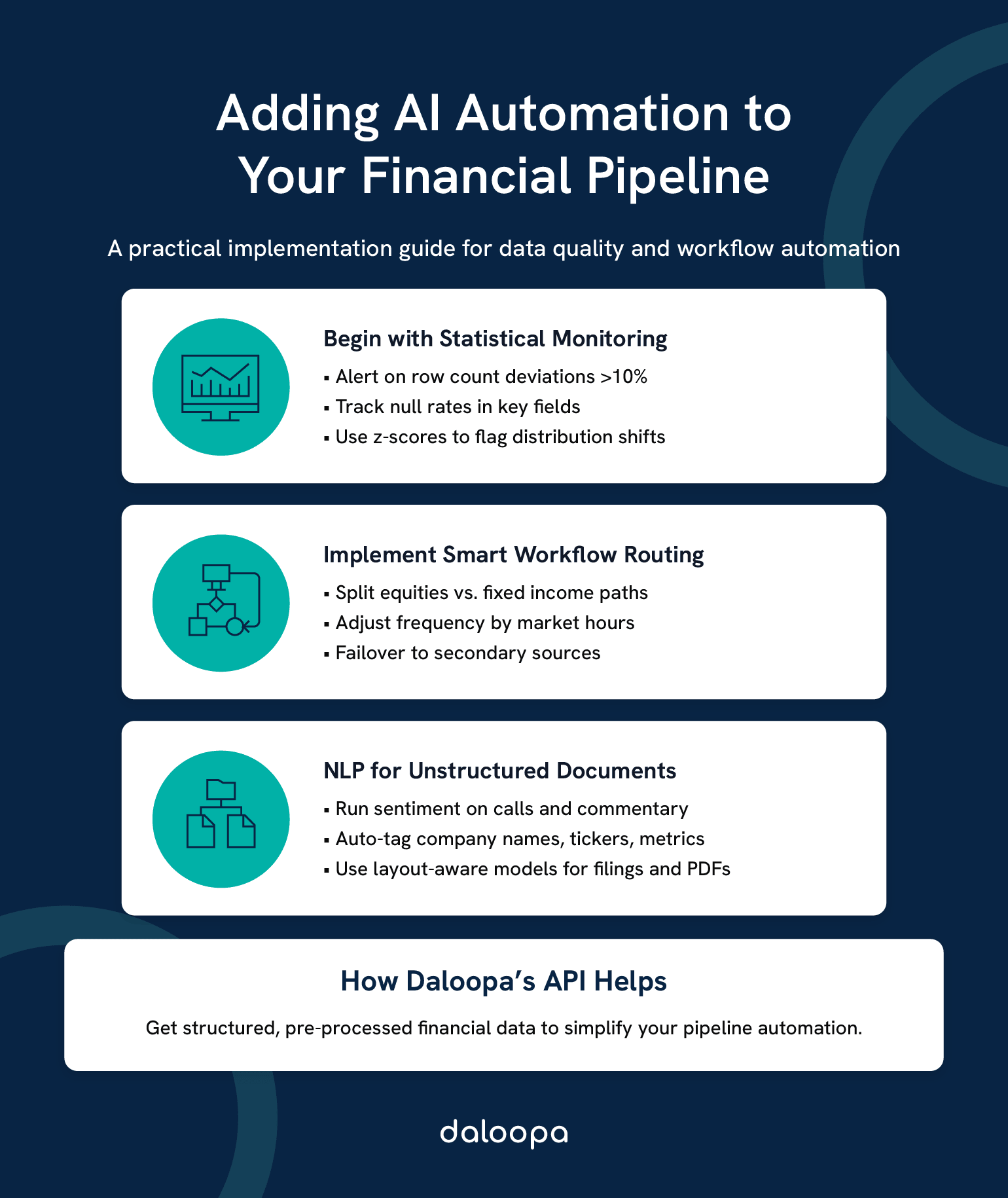
Start with basic threshold monitoring. Row count deviations greater than 10% from historical baseline deserve investigation. Null rates exceeding established thresholds signal extraction problems. Value distributions that shift suddenly indicate either real market events or data quality issues—both worth knowing about.
from scipy import stats
def detect_statistical_anomalies(current_data, historical_baseline, threshold=3):
anomalies = {}
# Row count check
expected_rows = historical_baseline[‘row_count’].mean()
if abs(len(current_data) – expected_rows) / expected_rows > 0.10:
anomalies[‘row_count’] = len(current_data)
# Distribution check for numeric columns
for col in current_data.select_dtypes(include=’number’).columns:
z_scores = stats.zscore(current_data[col].dropna())
outliers = current_data[col][abs(z_scores) > threshold]
if len(outliers) > 0:
anomalies[col] = outliers.tolist()
return anomalies
This catches most data quality issues that ML approaches would catch, with none of the model training, drift monitoring, or explainability challenges.
When ML Makes Sense
Sophisticated ML approaches earn their complexity in specific scenarios: detecting subtle patterns across many variables simultaneously, predicting failures before they occur based on leading indicators, or automatically classifying data quality issues by root cause. If you have a mature data platform, dedicated ML engineering resources, and problems that simpler approaches haven’t solved, ML quality monitoring can add value. Otherwise, invest in better alerting and runbooks first.
3.2 NLP for Financial Document Processing
Unstructured financial documents—earnings call transcripts, 10-K filings, analyst reports—contain valuable information that doesn’t flow through APIs. NLP techniques can extract structure from this content, but the practical approaches differ from general-purpose text processing.
Financial documents rely heavily on layout. Tables, headers, and spatial relationships convey meaning that pure text extraction loses. For parsing SEC filings or extracting data from PDF reports, layout-aware models (approaches that understand document structure, not just text content) outperform pure NLP.
Sentiment analysis on earnings calls has become commoditized. Pre-trained financial language models can score management tone, identify hedging language, and flag unusual phrasing. The challenge is less technical implementation and more establishing whether the signal is actually predictive for your use case.
Entity recognition (identifying company names, ticker symbols, executive names, and financial metrics in unstructured text) enables automated tagging and routing of documents. The accuracy is good enough for workflow automation, though human review remains necessary for high-stakes decisions.
The highest-value approach for most teams: rather than building document processing infrastructure, use APIs that have already done the extraction. Pre-processed, structured data beats raw document processing for most use cases.
3.3 Intelligent Workflow Automation for Real-Time Financial Data
“Intelligent automation” ranges from achievable (conditional routing, automated retry) to aspirational (self-healing systems that diagnose and fix novel failures). Understanding this spectrum prevents overcommitting to capabilities your team can’t deliver.
Achievable Automation
Conditional routing based on data characteristics works well. Different processing paths for equities versus fixed income. Accelerated schedules during earnings season. Alert escalation based on error severity. These patterns use straightforward logic and provide clear operational benefits.
Automated retry with backoff (covered earlier) handles transient failures without human intervention. Failover to backup data sources when primaries fail can be implemented if backup sources exist and data is compatible.
Adaptive scheduling (increasing pipeline frequency during market hours, reducing overnight) saves costs and compute while delivering fresher data when it matters.
Aspirational “Self-Healing”
True self-healing—systems that automatically diagnose and remediate novel failure modes—requires mature ML operations capabilities that most finance teams don’t have. It also requires failure patterns regular enough to train models against, which conflicts with the nature of novel failures.
The pragmatic approach: excellent monitoring, clear runbooks, and automated remediation for known failure modes. Invest in reducing mean-time-to-detection and mean-time-to-resolution rather than attempting to eliminate human involvement entirely.
Daloopa’s API provides pre-processed, validated financial data, reducing the complexity your pipeline needs to handle downstream.
4. Implementation Strategies and Excel Financial Automation Tools
4.1 Low-Code/No-Code Solutions for Finance Teams
The build-versus-buy decision for pipeline tooling depends more on organizational context than technical requirements.
Choose Low-Code When:
Your team lacks dedicated engineering resources but has technically capable analysts. Requirements are standard—pull from API, transform, deliver to Excel—without unusual complexity. Time-to-value matters more than long-term customization. Data volumes are moderate: under 100,000 rows per day, infrequent refreshes.
Power Automate, Power Query, and similar tools can deliver production-quality pipelines for these scenarios. The ceiling is lower than custom development, but the floor is much higher—a capable analyst can build working automation in days rather than weeks.
Choose Custom Development When:
Transformation logic requires complex calculations, lookups, or conditional processing. Volumes or latency requirements exceed low-code tool limits. Regulatory requirements demand complete audit control over code and infrastructure. Or you’re integrating with existing engineering platforms (CI/CD, monitoring, orchestration) where bespoke tools create operational silos.
The hybrid approach works for many teams: low-code for straightforward pipelines that analysts own, custom development for complex or high-stakes workflows that engineering owns.
4.2 Programming Approaches for Financial Data Pipelines
For teams building custom pipelines, Python has become the default choice—not because it’s technically superior for every task, but because the ecosystem is unmatched and talent is available.
The Python Stack
Extraction: requests for simple synchronous calls, aiohttp or httpx for async when you need parallelism across many endpoints.
Transformation: pandas remains the standard for tabular data despite its memory constraints. For larger-than-memory datasets, polars offers dramatically better performance with a similar API.
Orchestration: Airflow pioneered the space and has the largest community. Dagster and Prefect offer more modern developer experiences. All three handle scheduling, dependency management, and retry logic.
Excel output: openpyxl for read/write operations on existing files, xlsxwriter for high-performance write-only generation, xlwings when you need to interact with a running Excel instance.
The Reference Architecture
Scheduler (Airflow DAG / Cron)
↓
Extract (API client with backoff)
↓
Validate (schema checks, quality scoring)
↓
Transform (pandas/SQL/dbt)
↓
Quality Gate (threshold checks)
↓
Load (staging layer → Excel)
↓
Alert (on failure or quality issues)
Each stage should be independently testable and produce artifacts that can be inspected. When something fails at 3 AM, you need to identify which stage broke and why without re-running the entire pipeline.
See the Daloopa API best practices for implementation guidance specific to financial data extraction.
4.3 Cloud-Based Investment Data Pipeline Solutions
Cloud platforms provide managed services that reduce operational burden at the cost of flexibility and, sometimes, surprisingly high bills.
AWS Pattern: Lambda functions for event-driven extraction triggers. Glue for managed ETL with Spark under the hood. S3 for staging data between pipeline stages. EventBridge for scheduling. The advantage is serverless operations—no infrastructure to maintain. The disadvantage is vendor lock-in and costs that scale with execution volume.
Azure Pattern: Data Factory provides visual pipeline design with extensive connector support. Synapse handles transformation and analytics. Blob Storage for staging. Azure’s strength is enterprise integration, particularly for organizations already using Microsoft 365.
GCP Pattern: Cloud Functions for lightweight triggers. Dataflow (managed Apache Beam) for transformation at scale. BigQuery as both warehouse and analytics engine. GCP excels at large-scale data processing but has less mature financial services tooling than AWS or Azure.
Cost Reality Check
Cloud-native ETL services bill per execution. For pipelines that run frequently or process large volumes, these costs compound quickly. Teams with predictable workloads often find that containerized solutions on reserved compute cost substantially less than equivalent serverless implementations. Run the numbers before committing to architecture.
5. Security and Compliance for Financial Data Pipelines
5.1 Data Protection in Financial Pipelines
Security in financial data pipelines isn’t a feature—it’s table stakes. The data flowing through these systems includes material non-public information, customer details, and proprietary analytics. A breach has regulatory, legal, and reputational consequences.
Encryption Everywhere
Data at rest requires AES-256 encryption. For protecting financial data, AES-256 encryption is the go-to standard³, offering immense resistance to computational attacks with a number of possible key combinations that makes brute-force attacks virtually impossible with current technology. This applies to staging files, database tables, logs, and any other persistent storage. Cloud providers handle this automatically for most services, but verify configuration rather than assuming.
Data in transit requires TLS 1.3 for all API communications. TLS 1.3 encrypts data as it moves between systems³, ensuring that even if someone intercepts network traffic, the information remains unreadable. This includes internal service-to-service calls, not just external APIs. Man-in-the-middle attacks on internal networks are not theoretical.
Secrets Management
Never hardcode credentials. Not in code, not in configuration files, not in environment variables checked into source control. Use secrets managers (cloud-native options like AWS Secrets Manager, or tools like HashiCorp Vault) to store and retrieve credentials at runtime.
Rotate API keys and service credentials on 90-day cycles, following PCI-DSS key management requirements. Note that NIST guidance now recommends against mandatory periodic rotation for user passwords, but this does not apply to machine credentials—API keys, service accounts, and cryptographic keys still benefit from regular rotation to limit exposure windows.
Zero-Trust Architecture
Assume the network is compromised. Authenticate every service-to-service call, not just edge requests. Authorize based on minimum required permissions—a pipeline that reads from one API and writes to one database shouldn’t have access to anything else. Log all access for audit purposes.
5.2 Audit Trails and Monitoring for Compliance
For SOX-compliant pipelines, audit trails aren’t optional enhancements. They’re mandatory controls that auditors will examine.
What Must Be Logged
Every pipeline run must capture: what data was processed (source identifiers, record counts), when processing occurred (timestamps with timezone), what transformations applied (code version, configuration parameters), who or what initiated the run (service accounts, user triggers), and what output was produced (destination, checksums, record counts).
This logging must be immutable. Append-only storage, write-once systems, or cryptographic verification that logs haven’t been tampered with. If logs can be edited, they’re not audit-compliant.
Monitoring for Operations
Compliance logging serves auditors. Operational monitoring serves your team. Different purposes require different approaches.
Real-time alerting on pipeline failures gets humans involved quickly. Latency tracking identifies degradation before it becomes failure. Quality score trends reveal gradual problems that point-in-time checks miss.
Dashboard the metrics that matter: pipeline success rates, processing latency, data freshness, quality scores. When something’s wrong, the dashboard should make it obvious without requiring investigation.
5.3 Disaster Recovery and Business Continuity
Pipelines fail. APIs go down. Cloud regions have outages. The question isn’t whether you’ll face failures but how quickly you’ll recover.
Redundancy Patterns
Critical pipelines should run in multiple availability zones. If your cloud region fails, your quarter-end financial close shouldn’t fail with it. For the highest-criticality workflows, multi-region deployment provides protection against regional outages.
Backup data sources, where available, provide resilience against provider-specific failures. If your primary market data feed goes down, can you fall back to an alternative? The data might not be identical, but close enough for continuity beats perfect but unavailable.
Recovery Objectives
Define explicit targets for recovery time objective (RTO, how quickly you must restore service) and recovery point objective (RPO, how much data loss is acceptable).
Regulatory reporting pipelines typically need RTO under four hours—reports have deadlines. Analyst-facing data can tolerate longer recovery, perhaps 24 hours, with minimal business impact. Historical or archive data might have multi-day RTO.
Document these objectives, test recovery procedures regularly (not just backup verification, actual restoration tests), and update runbooks when procedures change.
6. Optimization and Scaling Automated Financial Reporting Systems
6.1 Performance Tuning for Large-Scale Financial Data
Before optimizing, measure. Premature optimization wastes effort on components that aren’t bottlenecks while real problems continue unchecked.
Identify the Bottleneck
Profile your pipeline end-to-end. Is the constraint API rate limits? Then parallelize across endpoints or negotiate higher limits. Transformation compute? Then vectorize operations and consider more performant data structures. Excel writing? Then stream writes and optimize file formats. Network latency? Then co-locate compute closer to data sources.
The bottleneck shifts as you optimize each stage. What limits performance at 10,000 rows daily will differ from what limits performance at 10 million rows.
Caching Strategies
Reference data—security master files, currency exchange rates, calendar data—doesn’t change frequently. Cache it aggressively. Load reference data at pipeline start, reuse throughout processing, and invalidate on schedule rather than checking freshness on every access.
The trap: caching business data that’s supposed to be fresh. A pipeline that returns yesterday’s prices because they were cached defeats the purpose. Cache reference data, not business data.
6.2 Handling Increasing Data Volumes in Banking API Integration
Data volumes grow. What works at current scale will eventually break. Building with growth in mind prevents painful re-architecture later.
Incremental Processing
Don’t reprocess everything on every run. Track high-water marks—the last processed timestamp or record ID—and fetch only new or changed data. This reduces API calls, speeds processing, and lowers costs.
The complication is handling late-arriving data and corrections. Design for occasional full refreshes to catch anything incremental processing missed, but default to incremental for routine runs.
Partitioning for Time-Series
Financial data is overwhelmingly time-series oriented. Query patterns filter by date range. Leverage this by partitioning data by date.
Date partitioning enables efficient pruning of old data, parallelized processing of independent date ranges, and performant queries that don’t scan irrelevant historical records. It’s among the most impactful scaling decisions for time-series financial data.
6.3 Future-Proofing Financial Data Infrastructure
APIs change. Providers get acquired. Regulatory requirements evolve. Architecture that survives these changes shares common characteristics: abstraction, modularity, and explicit versioning.
Abstract External Dependencies
Don’t scatter API-specific code throughout your pipeline. Abstract external APIs behind internal interfaces. When a provider changes their response format—and they will—you update one adapter rather than hunting through the codebase for every reference.
This abstraction also enables testing. Mock the interface for unit tests, hit real APIs for integration tests.
Modular Components
Build extractors, transformers, and loaders as independent components with defined contracts. When a data source changes, you replace one extractor without touching the rest. When transformation requirements evolve, you modify one transformer.
This modularity isn’t just architectural elegance. It’s operational necessity. Monolithic pipelines become unmaintainable as they grow.
Bringing It All Together
Building financial data pipelines that connect APIs to Excel with intelligent automation isn’t a nice-to-have—it’s the foundation of modern finance operations. Manual data wrangling doesn’t scale, introduces errors that compound, and burns analyst time that should go toward actual analysis.
The three-component architecture provides the framework: secure API integration that handles authentication complexity and failure gracefully, intelligent ETL processing that transforms data with compliance-grade audit trails, and automated Excel delivery that respects both Excel’s constraints and analyst workflows.
Your Implementation Roadmap
The first two weeks should focus on audit and discovery. Document current data sources and Excel workflows. Identify the highest-value, highest-pain manual processes. These are your initial automation targets.
Weeks three and four are about foundation building. Implement extraction for your highest-priority data source. Build the staging layer pattern that decouples pipelines from analyst workbooks. Get something running end-to-end, even if limited in scope.
Month two expands capability. Add transformation logic, quality checks, and basic monitoring. Extend to additional data sources. Establish patterns that subsequent development follows.
Month three scales and hardens. Implement compliance logging. Build alerting and runbooks. Document architecture for your future self and colleagues.
Quick Wins to Start Today
Replace one manual data pull with scheduled extraction. Add row-count monitoring to catch extraction failures early. Implement the staging layer pattern to eliminate file-locking issues. Each delivers immediate value while building toward comprehensive automation.
For teams that want pre-validated, audit-ready financial data without building extraction infrastructure from scratch, Daloopa’s API handles the complexity upstream—delivering analysis-ready data that plugs directly into your pipeline architecture.
References
- “SOX Section 302: Corporate Responsibility for Financial Reports.” Sarbanes-Oxley 101.
- “Excel Specifications and Limits.” Microsoft Support.
- “Financial Data Encryption: Compliance Best Practices.” Phoenix Strategy Group.
- “Exponential Backoff and Jitter.” AWS Architecture Blog.
- “SOX Section 404: Management Assessment of Internal Controls.” Sarbanes-Oxley 101.
- “Art. 17 GDPR – Right to Erasure (‘Right to Be Forgotten’).” General Data Protection Regulation (GDPR).
- “Art. 30 GDPR – Records of Processing Activities.” General Data Protection Regulation (GDPR).
- “Section 1798.145. Exemptions.” Consumer Privacy Act.
- “Latency Optimization in Trading.” FIXSOL.
- “NYSE Markets Hours and Calendars.” New York Stock Exchange.